Adding, Editing, Deleting, Cancelling & Printing Delivery Challan (DC) - Against Reservation
- Deepankana Roy (Unlicensed)
- Subhasree Banerjee (Unlicensed)
- Debrupa Datta (Unlicensed)
- Aparajita Basu Roy
A DC (Delivery Challan) is a document created during the transportation of goods from one place to another which may or may not result in sales. This is sent along with the shipped goods. It contains the details of the items shipped, quantity of those goods, buyer and delivery address.
Sometimes goods need to deliver from previously reserved items. When goods need to deliver to the destination site against Sales Order and Confirmed Pick List, then Delivery - Against Reservation need to be created.
This article describes the process of manage Delivery - Against Reservation in Ginesys Web.
The workflow for Delivery Against Reservation
Once GRC and Put Away are done, The following workflow must be followed for Delivery Against Reservation -
Create the Sales or Transfer Order which has Reservation Required checkbox enabled.
↓
Create a Reservation
↓
Create a Pick List
↓
Confirm Pick List
↓
Create a Delivery Against Reservation
Prerequisites
- The users' role must have access to the Add app operation in the Delivery-Against Reservation feature in Sales & Distribution - Operation - Packing through Roles in Ginesys Web - Admin - Security.
- Document Numbering Scheme must be present for the module.
- The masters must be present - Item, Customer, Agent, etc.
- Pick List must be created.
Step-by-step guide
The process is divided into the following steps:
- Go to Ginesys Web > Sales and Distribution > Operations > Packing > Delivery - Against Reservation.
- Delivery Challan (Against Reservation) module will open
- All the previously created DCs will be listed here.
- Click on Add button.
- Delivery Challan (Against Reservation) window will open.
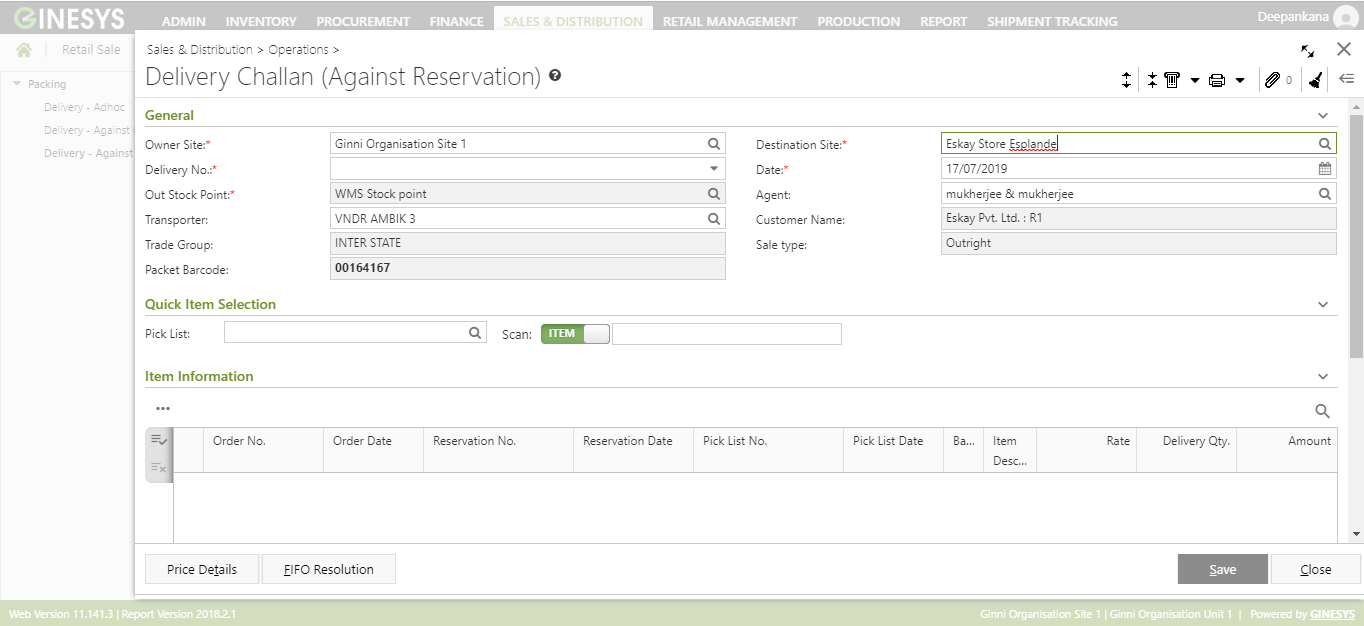
- You will get group of icons at the right corner of the window.

- The icons name from left to right are - Expand All, Collapse All, Print Barcode, Print Document Report, Attachments, Clear Form and Open Side Panel.
- Expand All: Clicking on this icon, all the sections will be Expand if they are collapsed.
- Collapse All: Clicking on this icon, all the sections will be Closed if they are expanded.
- Print Barcode: Clicking on the Down Arrow beside this icon, you will get Print Preference option. This option is used to print barcode.:
- Print Document Report: Clicking on the Down Arrow beside this icon, you will get Print Preference option with already created Report File Template. This option is used to print document.
- Attachments: You can Upload some required documents from this option.
- Clear Form: Clicking on this icon, you can Clear all the data already entered.
- Open Side Panel: Clicking on this, you will get the details of the current Delivery Challan as follows:
- Document Summary: In this section you will get the details of Selected Items, Sale Type, Owner Site, Modified by etc.
- Customer Details: You will get the Selected Customer Details like Address, Contact Details, Tax Region, Credit Limit, Overdue Amount etc.
- Customer Statistic: This section describes the Delivered not Invoiced amount, Outstanding Amount, Last Invoice Date etc.
- You will get four sections - General, Quick Item Selection, Item Information, User Defined Fields and Others.
- General:

- Select the Owner Site (Mandatory Field) for which you want to create the Delivery Challan.
- Select a Document Numbering Scheme, already created in the master, from the drop down list Delivery No. (Mandatory Field).
- Select the Out Stock Point (Mandatory Field) from the Out Stock Point Pop-Up form.
Packet Barcode field will be generated automatically at the time of opening the Delivery Challan(Against Reservation) window in the Add mode. This is a read only field.
Note: First 3 characters will be Company Code & last 5 characters will be DCCODE.
- Select the Destination Site (Mandatory Field) from the Destination Site Pop-Up form. Transporter, Trade Group, Agent, Customer Name and Sale Type will be populated as per Destination Site selection. You can change the Transporter and Agent from the Transporter and Agent Pop-Up window respectively.
- System date will be populated in the Date field (Mandatory Field). You can change the date as per your requirement. You can only select the past date from the system date but not any future date.
- Quick Item Selection:

- Select the Pick List from the drop down list. The Pick List(s) will be listed as per selected Destination Site.
Select the Scan type - Barcode or Set. You can scan item barcode or set barcode directly from this field. Enter the barcode of the pending items present in the selected sales order. The scanned items or set will be listed in the Item Information section.
Impact of Batch/Serial functionality on Quick Item Scan Mode
- On scanning of Item, open a Batch or Serial selection window respectively. (Only those pending batches/serials will be displayed that exists in the picklist no. provided).
- On scanning of Set, open a multi Batch/Serial selection window. (Only those pending batches/serials will be displayed that exists in the picklist no. provided)
- On scanning of (Item + Batch/Serial), Batch/Serial window will not open for selection instead system will auto setoff the quantity and populate the batch/serial number in the grid.
Note: If the scanned items or set in not present in the selected Pick List or not pending, then you will get a message - "You have scanned an invalid item/the item is no more pending/the item does not belong to any pending picklist. Please select another item." If you click on the Continue button, you can entry the correct barcode.
Pre-requisites for Set selection
- The profile setting - Allow Set item selection in Receipts must be selected.
You need to select whole set items or need to remove all the items from set. You cannot select partial items from set.
- Item Information:
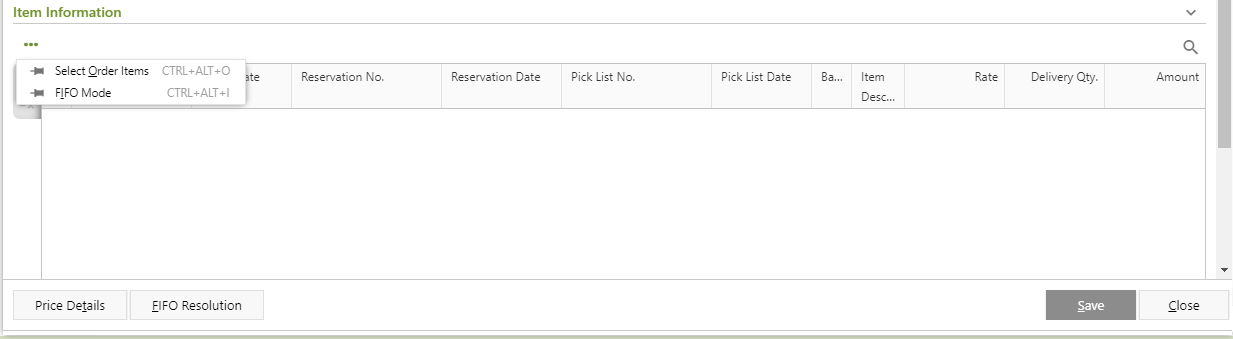
You need to add items in the Delivery Challan by using Select Order Mode and FIFO Mode.
Note: You can add items to one Delivery Challan in different mode.
Impact of Batch/Serial functionality on Item Selection
Changes in Item Grid
Four new columns have been added in the grid - Batch/Serial No., Mfg. Date, Valid Upto and Inventory Tracking
Above columns are added in all three Delivery Challan forms - Adhoc, Against Order and Against Reservation.
All column types to be “View only”, i.e. modification is not allowed.
The columns are hidden by default but can be visible by the column chooser.
Values are displayed as populated from the various Item selection modes.
Note : Quantity of serial managed items can’t be changed in grid.
”Quantity of serial managed items can’t be changed” [OK].Data displayed are made hyperlink
On clicking on the record(having value), popup window will be displayed.
Batch Detail window on item scan will open in display mode.
Window will display details of Batch/Serial information for the respective batch
Validations :
Quantity for serial managed items must be Scan Unit for that item.
Serial Number can not repeat for an item.
Error Msg - ”Duplicate serial number is not allowed for an item.”Batch/serial details are not required for items where, inventory tracking = item wise.
Error Msg - ”Batch/Serial details are not applicable for this item”.
Note: batch/Serial details include, batch/serial number, pricing information and expiry information.
- Click on the Select Order Items.
- Order Mode window will open.
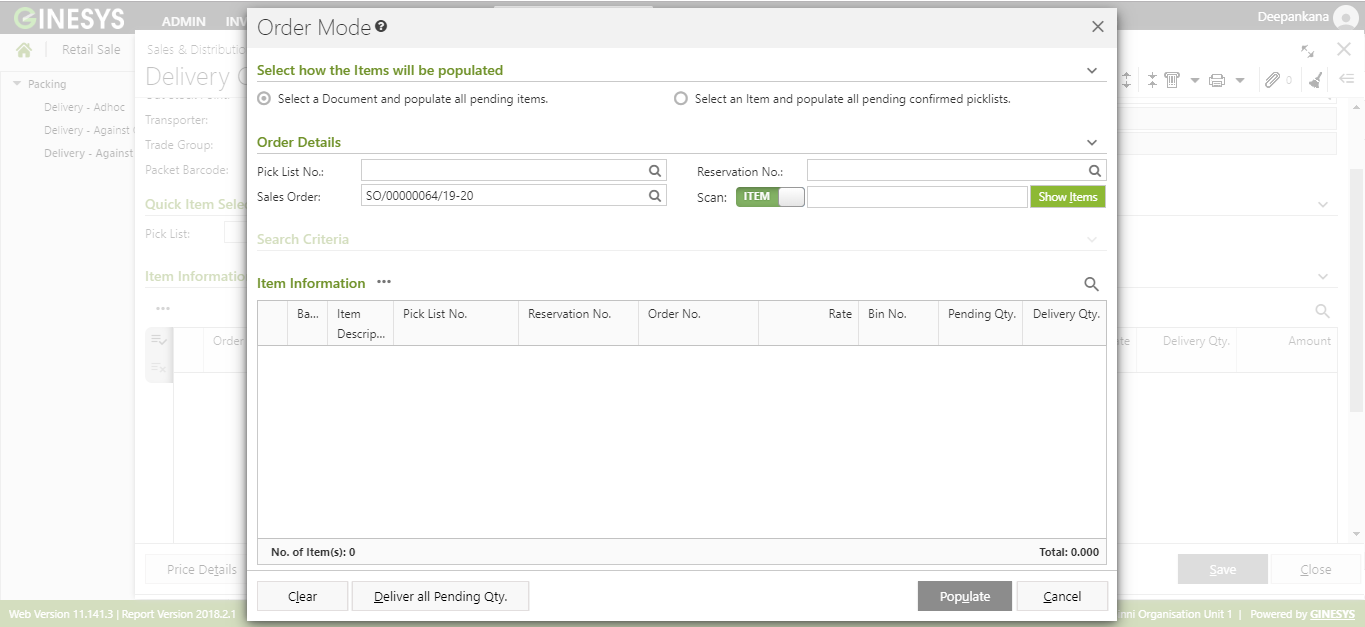
- Select how the items will be populated - Select a Document and populate all pending items or Select an Item and populate all pending confirmed picklists.
- Select a Document and populate all pending items:
You will get search criterias - Pick List No., Reservation No., Sales Order and Item or Set Barcode. You can put data into any one of these or all of these to search item(s).
Note: All the above listed data will be populated as per selected Destination Site.
- Enter the barcode of pending Item or Set present Pending and Confirmed Pick List.
Click on the Show Item button.
After opting for Select an order and populate all the pending item, if you put an item barcode in the Scan Barcode field, you will get a warning message - "Please select at least one document to proceed."
- That particular item will be populated. If you do not scan any barcode then all the pending items, present in the selected Sales order, will be populated.
- Select an Item and populate all pending confirmed picklists:
- Scan the Item or Set barcode from the Item Barcode field and press Enter key.
- Scanned item will be populated with Order No., Pick List No., Reservation No. etc in which the item is present.
- You will get Search Criteria like Divisions , Sections, Category etc. to search particular item from the list.
- Select one or more than one of them from the list.
- Select a Document and populate all pending items:
- Put in the Delivery Oty. You can click on the Deliver all Pending Qty. button to populate all the pending quantity in the Delivery Qty. field.
- Click on the Populate button.
All the selected items will be listed with Rate, Deliver Qty., Pick List No., Reservation No., Amount etc. in the Item Information section.
Impact of Batch/Serial functionality on Order Mode Flow
Three new columns have been added in the Order Mode → Item Information grid: Batch/Serial No., Mfg. Date and Valid Upto
All column types are “View only”, i.e. no modification is allowed.
Columns have been added after Item description.
The columns are hidden by default but can be visible by selecting from the column chooser.
- Select a Document and populate all pending Items
Workflow
Provide an Order No. and insert delivery quantity by scanning of Items/Sets or Item+Batch/Serial or through search criteria or through import barcode or manually or click deliver all pending qty.
On scanning of (Item + Batch/Serial), window will not open for selection instead system will auto setoff (logic remains as-is, Hint: det code wise asc) the quantity and populate the batch/serial number in the grid.
Scanning of item
- On scanning of Item, open a Batch or Serial selection window respectively. (Only those pending batches/serials will be displayed that exists in the picklist no. provided).
- On scanning of Set, open a multi Batch/Serial selection window. (Only those pending batches/serials will be displayed that exists in the picklist no. provided)
- On scanning of (Item + Batch/Serial), Batch/Serial window will not open for selection instead system will auto setoff the quantity and populate the batch/serial number in the grid.
Search criteria (existing behavior as-is) - all order items along with batch/serial details as existing in respective picklist to get populated in item grid
Import barcode
New column has been added - ‘Batch/Serial No.’
Window will not open for selection of batch/serial instead system will auto populate the batch/serial number provided in import barcode column in the grid.
Insert delivery quantity manually.
Click deliver all pending quantity.
Select an Item and populate all pending confirmed Picklists.
On item Scan, all pending picklist along with Batch information detail to populate in item information grid.
Scan Item will allow both Icode & icode concat, in case of concat system will only consider value before the separator.
Search criteria (existing behavior as-is) - all order items along with batch/serial details as existing in respective picklist to get populated in item grid
Import barcode
As-is-flow except in case of concatenated barcode, system will only consider value before the separator.
Clicking populate behaviour
As existing, populate function button populates all the items in the DC main item grid.
All the existing validation remain same for each item selection option.
Click on the FIFO Mode.
FIFO Mode window will open.
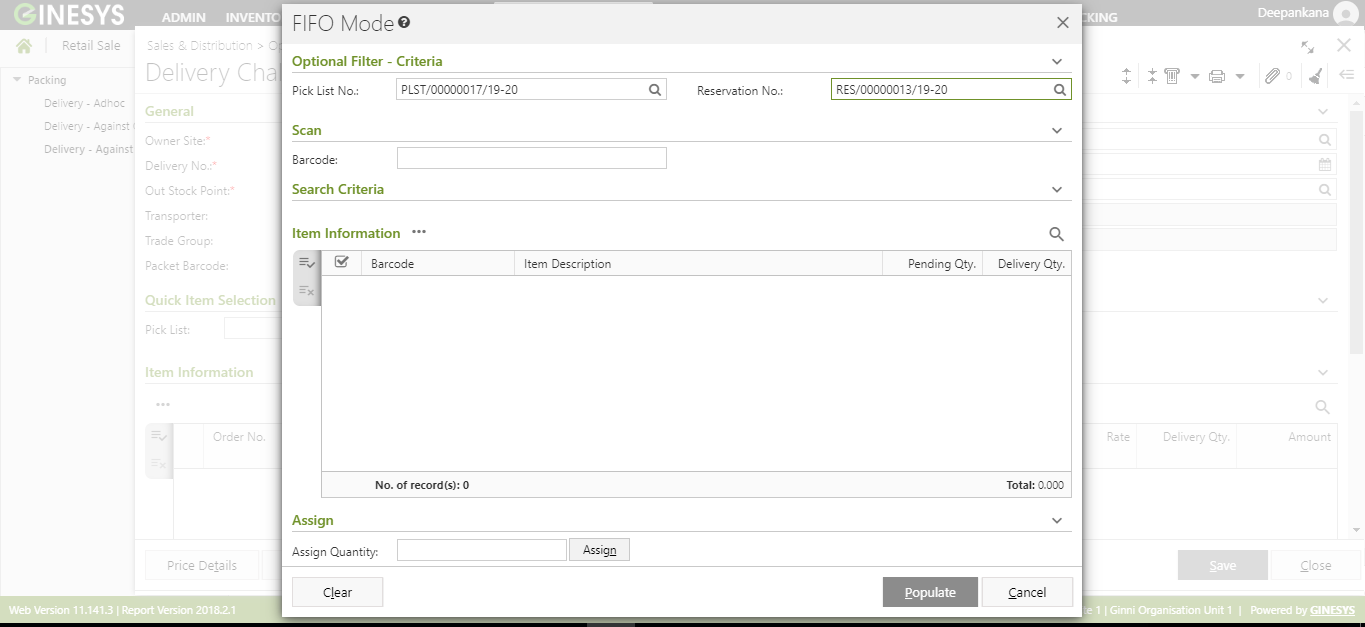
You will get two filters - Pick List No. and Reservation No.
You can select the items which is present in the selected Pick List and Reservation No. through Select Item, Scan Item and Import Barcode.
- The selected Item or Set will be populated in the Item Information section.
You can modify the quantity by putting the desire quantity in Assign Quantity field.
Note: Assign Quantity must be less than or equal to Pending Quantity. If the Assign Quantity is more than the Pending Quantity, then you will get an error message beside the item - "Delivery Quantity cannot be more than Pending Quantity."
- Click on the Populate button.
The item(s) will be listed with Rate, Deliver Qty., Pick List No., Reservation No., Amount etc. in the Item Information section.
Impact of Batch/Serial functionality on FIFO Mode
Three new columns have been added in the grid - Batch/Serial No., Mfg. Date and Valid Upto
All column types are “View only”, i.e. no modification is allowed.
- The columns are hidden by Default.
Changes in column selection are retained in grid state.
On Scan behaviour
Only ICODE scanned: Open a Batch or Serial selection window/or auto populate as the case may be. (Behaviour of this section would be similar to Scan item → Automatic mode; Only those pending batches to be displayed that exists against the picklist for the scanned item).
ICODE + BATCH/SERIAL scanned: window will not open for selection instead system will auto populate the batch/serial number in the grid.
On Set Scan: Multi item Batch/Serial selection window to open for on scanning item set. (Only those pending batches to be displayed that exists against the picklist for the scanned item).
On Import Barcode
New column has been added in the Import Barcode file - “Batch/Serial No.”
Search Criteria: On clicking on Search button,
As in current scenario, all items along with batch/serial details, according to search criteria gets populated in the item information grid.
On clicking populate, System will auto setoff the order and populate along with the batch/serial number in the main item grid.
The validation occurs in the following order - Negative stock check > Delivery of expired items
- Total No. of Item, Total No. of Qty and Basic Value will be calculated and populated.
- If you click on the
 button left side of the populated item, you will get two option in the drop down list -
 - requirement.
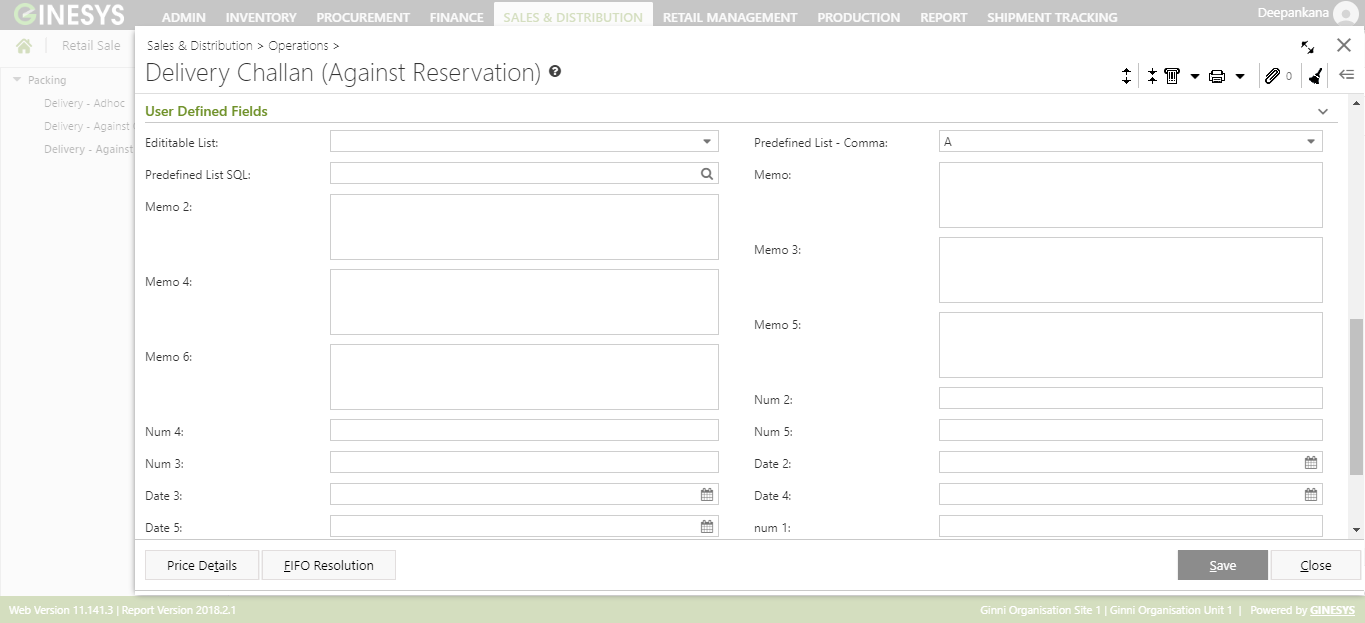
- User Defined Fields: There are various User Defined Fields - Memo, Num, Date etc, present in Delivery Challan - Against Reservation.
If the selected items have Negative or Zero stock, you will get a Warning - Negative Stock Alert! window. There are two options - Ignore and Cancel.
If you click on Ignore, the Delivery Challan will be saved with negative stock.
If you click on Cancel, then you will get back the Item Information section to remove the Item(s) and re-select item(s) without negative stock.
Note: The profile security -
- Alert: "The Customer is either exceeding the Credit limit or the Overdue limit. Cannot Proceed!" and stop execution.
- Warning:
Note: After saving one Delivery Challan, the Customer details section in the header part will remain same. You can create more than one Delivery challan for one customer.
Prerequisites
- The users' role must have access to the Edit app operation in the Delivery-Against Reservation feature in Sales & Distribution - Operation - Packing through Roles in Ginesys Web - Admin - Security.
Delivery Challan must be created.
Step-by-step guide
The steps are as follows:
- Go to Ginesys Web > Sales & Distribution - Operation - Packing > Delivery - Against Reservation through
- Delivery Challan (Against Reservation) will open.
- List of already created Delivery Challan will appear.
Select the one Delivery Challan you want to edit.
You can use Filter to search particular Delivery Challan(s).
Note: If you select multiple Delivery Challan, you will get the Edit option disabled. You cannot edit multiple Delivery Challan at a time.
- Go to Action > Edit.
- Edit Delivery Challan (Against Reservation) window will open.
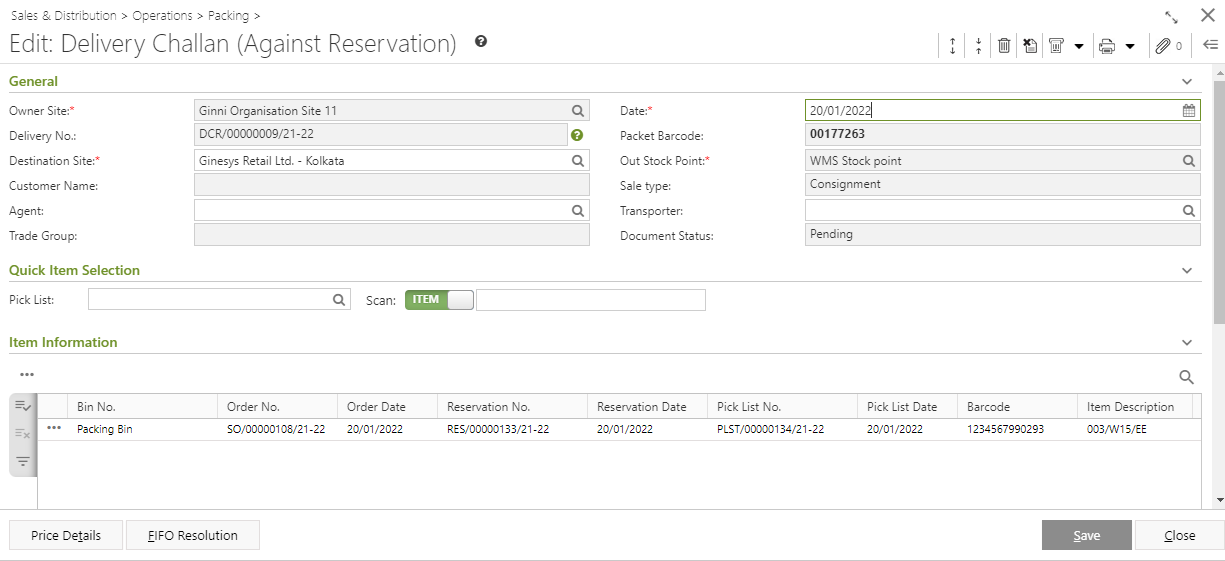
- All the details will be populated.
- You can Change Destination Site. According to the destination Site, others details will be populated.
- You can Add new Item and Item Set in the Delivery Challan in Edit Mode same as Add Mode.
- You can Delete Items from Delivery Challan in Edit Mode.
Click on the Save button to save the modified Delivery Challan.
Information

You will get Delete and Cancel icon in the Edit mode with others icons at the top right corner of the window.
Show Message: This icon will show the message regarding edit o
Delete: You can Delete the Delivery Challan from the Edit Mode by clicking on this icon.
Cancel: You can Cancel the Delivery Challan from the Edit Mode by clicking on this icon.
Prerequisites
- The users' role must have access to the Delete app operation in the Delivery-Against Reservation feature in Sales & Distribution - Operation - Packing through Roles in Ginesys Web - Admin - Security.
- Delivery Challan must be created.
- Delivery Challan must not be canceled.
Step-by-step guide
The steps are as follows:
- Go to Ginesys Web > Sales & Distribution > Operation > Packing > Delivery - Against Reservation through
- Delivery Challan (Against Reservation) will open.
- List of already created Delivery Challan will appear.
- Select the one Delivery Challan you want to edit.
- You can use Filter to search particular Delivery Challan(s).
- Go to Action > Delete.
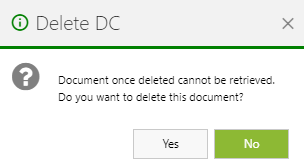
- You will get a message - "Document once deleted cannot be retrieved. Do you want to delete this document?"
- If you click on Yes, you will get a confirmation message "<Delivery Challan No:> - Successfully deleted".
Prerequisites
- The users' role must have access to the Cancel app operation in the Delivery-Against Reservation feature in Sales & Distribution - Operation - Packing through Roles in Ginesys Web - Admin - Security.
- Delivery Challan must be created.
Delivery Challan must not be canceled.
If privilege for DC - Cancellation is defined as Level-2, Level-3, Level-4 in the desktop application, the migration in the web application will be done with Cancel app operation as allowed (tick marked).
If privilege for DC Cancellation is defined as Level-1 in the desktop application, then Cancel app operation will be disallowed (Un-tick marked) in web application.
Step-by-step guide
The steps are as follows:
- Go to Ginesys Web > Sales & Distribution > Operation > Packing > Delivery - Against Reservation through
- Delivery Challan (Against Reservation) will open.
- List of already created Delivery Challan will appear.
- Select the one or more than one Delivery Challan you want to cancel.
- You can use Filter to search particular Delivery Challan(s).
- Go to Action > Cancel.
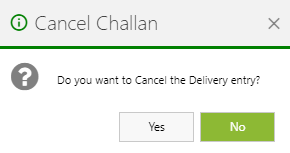
- You will get a warning message - "Do you want to Cancel the Delivery entry?"
- If you click on Yes, the Delivery Challan will be canceled and you will get a message - "<Delivery Challan No:> - Successfully cancelled."